Artificial intelligence isn't the future but the present of every company. Is yours ready?
April 22, 2026
10 minutes
Readings
Has your offspring already written their homework, term paper, and even thesis using AI, while you're just getting started with tools like Chat GPT?
You might think that generating ideas and texts isn't what your company needs (even though it might be exactly what it desperately needs). However, text generation is far from the only AI function that can revolutionize how your business operates. Artificial intelligence can be integrated into daily processes and records, making it the most efficient employee, working anytime, without breaks, professionally and accurately.
Wouldn't you also want AI to free up your team's hands, improve overall productivity, accelerate processes, and perfectly complete tasks? We probably know the answer.
Yes, we live in an era where technological progress and process automation are essential for humanity's functioning. We want everything done quickly, flawlessly, and to be one step ahead of the competition. This is where AI comes in.
This scenario frightens some people (let's be honest, quite a few movies have been made about humanity's extinction by terrifying artificial intelligence). He who does not adapt will not survive.
Content is the foundation of every organization
What do we mean by content? It's the data a company uses to create better products and services, but also on employee growth and more efficient teamwork. The amount of data is growing exponentially, and your company is no exception. However, this content needs to be organized and managed with processes, security, and compliance.
Innovative AI-powered content and data management solutions are becoming the standard today. They will enable your company to accelerate, get ahead of the competition, and make your data even more valuable for the growth of your organization and employees.
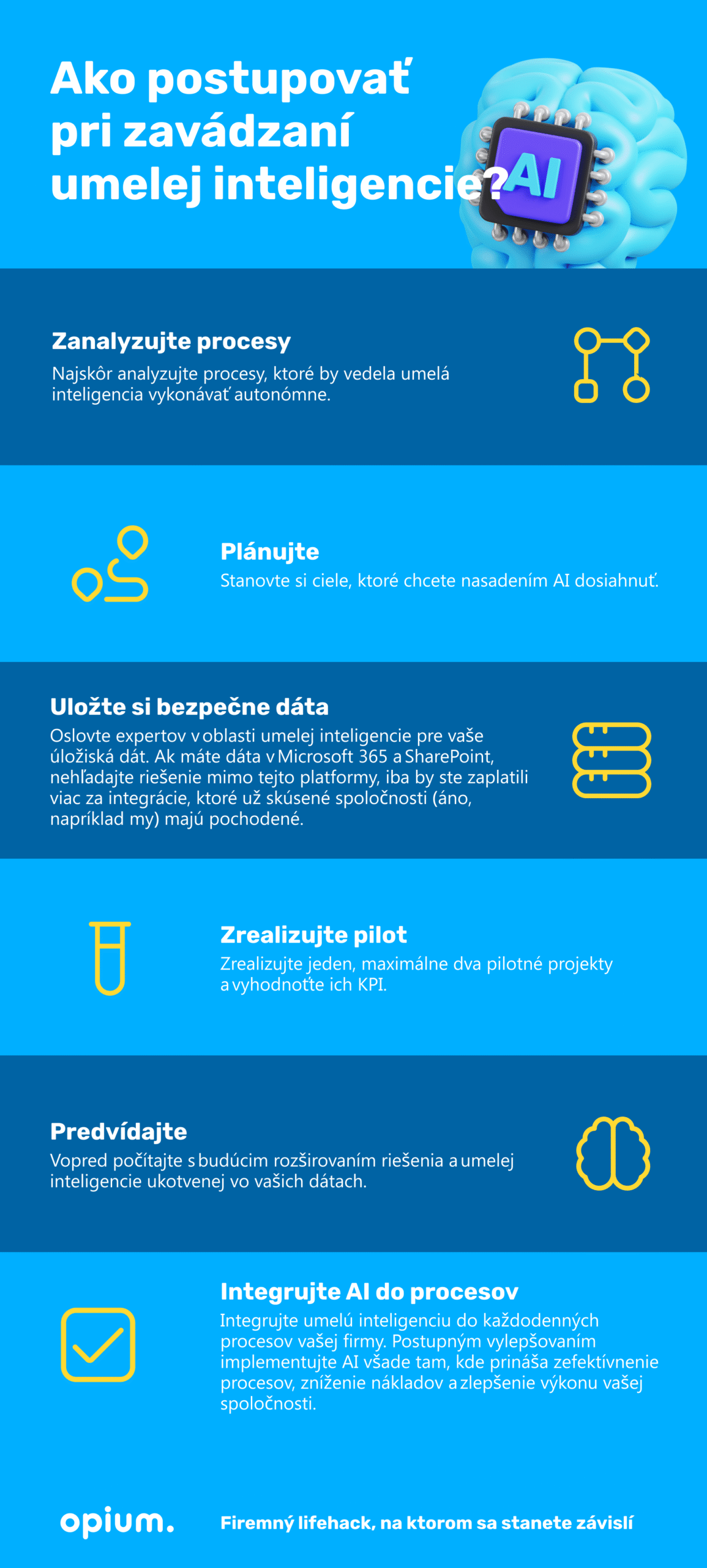
First, look at your content, data, and processes, and only then flirt with artificial intelligence.
What came first – the chicken or the egg? If you have a similar dilemma when organizing your company and don't know where to start, we offer you a stepping stone.
First, try asking yourself these questions:
How do we maintain our data and content today? Is it a file server or cloud storage?
Is our data structured?
Are we using metadata?
Does our business have a data structure?
If you haven't resolved these questions, set aside AI integration for a moment. First, organize your records of orders, customers, products, and other information. Well-structured data and content will enable artificial intelligence to effectively extract and use your content for process management and automation.
We address these questions and more in companies on a daily basis. Our recommendation?
SharePointis the world's largest and most flexible cloud content management platform. It powers the entire Microsoft 365 – OneDrive, Teams, Syntex, Viva, Loop, and Stream. Your SharePoint content is the primary data source for AI. Most companies already use SharePoint today. If you're not one of them yet, artificial intelligence should be the final argument for deploying it in your company as well. Thanks to SharePoint Premium and Syntex, you can Turn your company data into company gold that will help automate processes, improve employee efficiency, and enhance customer experience.
Surprise, surprise, Enterprise!
To have ready Data in the right place and accessible to every employee is a topic that we specialize in. Therefore, we can confidently state, in the Queen's English, that the most effective model is Enterprise solution in Microsoft 365, which is custom-built to the needs of every company. The model's strongest qualities are simple cooperation and team awareness.
Another excellent feature of this solution issecurity. arises based on a unified approach to content in Microsoft Teams, which brings synchronization and information sharing in the intranet combined with simple communication in chats, audio and video calls, and applications integrated into Teams.
Artificial intelligence further emphasizes these benefits. SharePoint, as the backbone of this solution, enables the creation of rich applications that make process, data, and document management simple and clear.
Cherry on top for Enterprise?
Data prepared this way can be provided to artificial intelligence., which can use them quickly and effectively through SharePoint. The result of its activity will be added to the integrated system as structured data, so will be possible to further process and use for decision-making processes, calculations, or automation. That sounds quite tempting, wouldn't you say?
How specifically to save time and increase productivity thanks to artificial intelligence?
AI can draft contracts based on information entered into a form. – this reduces the need for lengthy manual data entry.
It can extract data from invoices and place it into an accounting system. – this streamlines the accounting process, reduces errors, and saves the company costs.
It can be customized to suit specific business needs (e.g., labeling, workflow automation, document processing) – this allows organizations to implement AI according to specific needs without compromising functionality or security.
Automatic data entry filling using AI
You can enrich your company records with SharePoint database columns and artificial intelligence. automatically complete detected values. Through AI document analysis, it is possible recognize document types or content and Categorize information if sensitive or containing personal data (addresses, phone numbers, credit cards, and the like).
Besides that, AI can intelligently add information to documents based on their context, which increases their relevance and value for your company. For example, it can automatically suggest keywords or document tags based on their content, making it easier to find related documents in the future. This AI-powered feature allows employees to focus on their core work while the AI handles efficient content organization.
Which content platform should be used to be AI-ready?
Content platforms should do more than just store files. They must offer comprehensive solutions that are ready for features on any file throughout the lifecycle of your important documents. The key is that your content platform supports the documents and data you use within the company. It should work with metadata and processes over the basic Office package (Word, Excel, PowerPoint, or Loop), but also provide the widest possible future content support.
We are returning to SharePoint again, which offers unparalleled support for over 400 file types. It also ensures document management, such as PDFs, to which you can add annotations, comments, mentions, or tasks.
Leverage data from external suppliers and customers
Thanks to an external document portal in SharePoint, your company can obtain data from your customers or suppliers. This can include invoices, orders, or supplier reports that AI can directly extract and use for Process management or business report generation.
External suppliers or customers send contracts or orders for signatureusing a digital signature, which will subsequently allow artificial intelligence to initiate automated process steps. Despite the automation, emphasis is placed Safety first – AI will analyze and select high-risk contracts that require your direct attention (including a list of identified risks).
AI Use Cases for Your Business
Creation of an online advertising strategy and ad copy
Generating images, texts, and descriptions for products and services
Data analysis for customer segmentation
Automated purchasing of inventory and goods for production processes
Creating personalized recommendations, notifications, and messages for customers
Chatbots and virtual assistants for employees and customers
Predictive analytics and optimization of costs, profits, and risks
Process and Business Document Optimization (Contracts, Invoices, Orders)
Document Lifecycle Management
Automatic data filling
Do you know if your AI company is ready?
The implementation of artificial intelligence can be a difficult journey if you have the wrong You define the plan and objectives. A company ready for AI deployment understands its potential as a strategic asset for the benefit of both the business and its customers. The level of AI readiness can be measured and analyzed based on – you’ve probably guessed what’s coming – give to the content. If you have properly prepared data and documents, ideally in SharePoint including metadata, the integration of artificial intelligence will be a piece of cake for your company.
AI. A game-changing technology.
We are truly living in groundbreaking times. What older generations wildly fantasized about and filmed in futuristic movies is becoming our daily reality. It is an era where AI is transforming not only technological industries but also the way we work.
From process automation to effective content management, AI is bringing about an inescapable revolution. And one you won't want to escape.
AI is a necessity for businesses that want to thrive. SharePoint, content structuring, time savings, and increased productivity – a small taste of what will simplify your daily business existence. Preparing for AI integration is becoming a key step for the future of every (efficient and successful) business. It's time to open up to new possibilities where AI is not just a tool, but a guide for your business into an era of endless opportunities. And we will be happy to accompany you through this process. Just contact us. arrange only a meeting.
Share post
Article content
Do you know where exactly you're wasting time and money?
Launch our NONSENSE SCANNER. In 3 minutes, you'll find out how much precious time and money you're actually burning on unnecessary operations.
We use technologies such as cookies to store and/or access device information to provide the best experience. Consenting to these technologies will allow us to process data such as browsing behavior or unique IDs on this site. Not consenting or withdrawing consent may adversely affect certain features and functions.
Functional
Always active
Technical storage or access is necessary for the legitimate purpose of enabling the use of a specific service explicitly requested by the subscriber or user, or solely for the purpose of transmitting a communication over an electronic communication network.
Preferences
The technical storage or access is necessary for the legitimate purpose of storing preferences that are not requested by the subscriber or user.
Statistics
Technical storage or access that is used exclusively for statistical purposes.A technical storage or access that is used exclusively for anonymous statistical purposes. Without a subpoena, voluntary compliance by your Internet Service Provider, or additional records from a third party, information stored or retrieved solely for this purpose can usually not be used to identify you.
Marketing
Technical storage or access is necessary to create user profiles for ad serving or user tracking on a website or across multiple websites for similar marketing purposes.