How to make Teams a place that fosters efficiency instead of creating stress
April 22, 2026
8 minutes
Readings
A handy application that can significantly improve workflow, but also add a wrinkle or two if used in an unorganized manner. Microsoft Teams. It opens doors to a whole new level of digital collaboration, yet some still feel reluctant to work with it (if you just silently agreed, you'll love this article). So, how can you best utilize the features of this app? We bring you some tips and tricks to help you gain full control over Teams and create a clear and productive work environment without chaos in the workplace or in your mind.
Forget confusing structures and disorganized setups. With Teams, you can create a logical system that makes it easy to quickly find information, stay organized, and share information seamlessly with your team.
TIP: Always have only one copy of the file. Save the file in the correct location so people can access it.
Everything under one roof
A clear file organization is just the tip of the iceberg when it comes to the benefits of Teams. The beauty lies in the simplicity of this solution: you only need one application where you can not only share documents but also communicate with colleagues or organize meetings and webinars. Leave internal email communication in the past. In Teams, you can create private conversations or specific thematic chats. You can collaborate on documents directly in Word, presentation applications, Figma, Miro, LiveBoard, and other tools directly within Microsoft Teams. Therefore, everything you need for efficient work can be managed in one window with minimal investment, without the need to pay for various additional applications.
Organizing meetings and webinars
Meetings are an integral part of working in Teams. But did you know about webinars? With the webinar feature, you can easily share information with a wider audience, interact with participants, and enjoy benefits like easy management and recordings for later playback. And what do you need to do? Just share a link and invite people. Easy.
TIP: When creating them, remember to clearly define the goals and agenda for each meeting and webinar. This will make your meetings much more productive and effective. The standard meeting time should be approximately 25 minutes, when people can fully concentrate. With longer durations, attention spans, and therefore meeting effectiveness, tend to decrease.
New conversations, teams, or posts?
Too many teams, private and shared channels, or a nonsensical amount of conversations with multiple topics mixed together. Every so often, a new (often unnecessary) notification flashes, and yet you feel like you're always missing something important. Does this sound too familiar?
You are not alone in this. Let's therefore look at how to make Teams a place that increases efficiency rather than cortisol levels.
Sometimes, instead of creating a new team, you just need to create a new one. chat. When is it appropriate? If you need to communicate and share information quickly with a small group of people or individually, chat is the best choice. It is more suitable for informal communication, such as ad hoc discussions or short conversations. Therefore, it is ideal for temporary, irregular, and short-term purposes.
Teams should be reserved for longer-term projects or larger groups of people working towards a common goal. It also serves if you need to create a suitable collaborative context.
Posts They are useful for sharing information, such as chat results or meeting outcomes. Use them for discussions on topics that everyone should have the opportunity to contribute to.
Tips and tricks for working in Teams
Don't be afraid Cancel or hide teams and chats, which are no longer relevant to you. Only follow those that are important to you. If you hide a team, you will still have access to its content, and your teammates will not know that you have hidden it.
Create new chat for the same group, if it's necessary to discuss completely different topics.
Don't let unnecessary notifications distract you. Customize notification settings so that they suit your needs.
Using @ (mention) tag those who should respond to your message (This applies to chats, posts, and teams when you are expecting a response from specific individuals).
Take care of your own work and responsibility for it – plan and stay focused. Use the To-Do list for personal tasks.
Pull most commonly used teams and conversations up in the Teams list.
Name group chats descriptively.. Don't be afraid to use emojis in names for better distinction (although the golden rule applies here – less is more).
Use reactions (e.g., a raised thumb) to acknowledge that you've seen a message.
Ask for reactions instead of one-word answers (e.g., “give a <3 to the message if you can attend" or use a poll).
However, Microsoft Teams isn't just about communication. You have the option to work as if you were in a web browser, allowing you to connect various applications. These open up broad possibilities for organizing webinars and meetings, and take productivity to a new level.
DOer – Your personal Teams assistant at your service
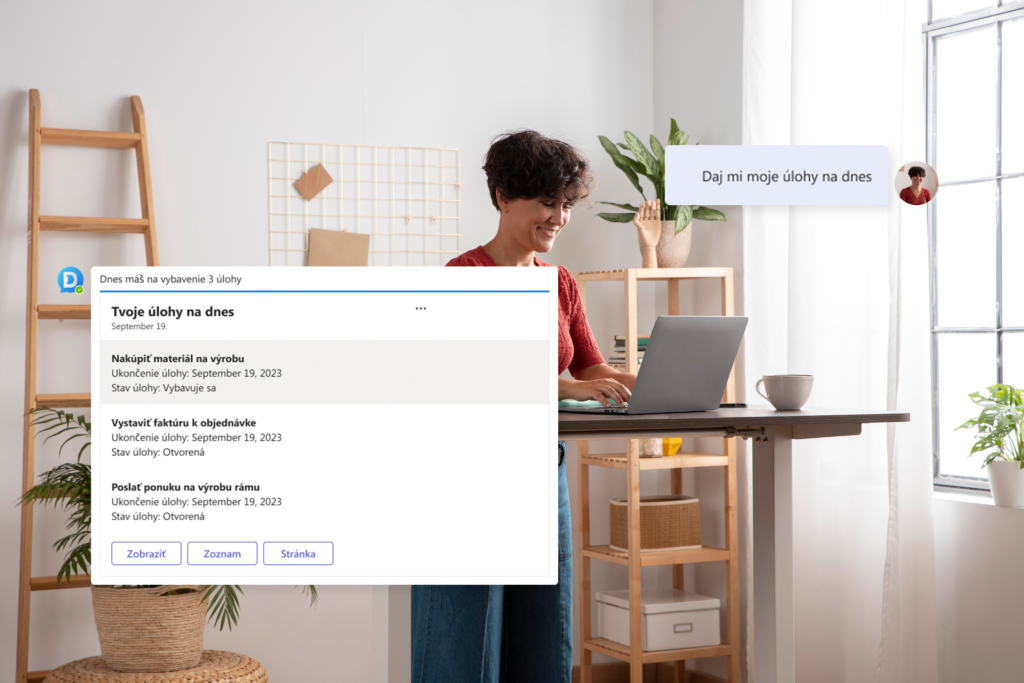
Working in Teams can be even easier. More organized, clearer, and completely intuitive. Thanks to DOer application SO that you maximize your time, and instead of endlessly searching for and organizing items, DOer will do it for you.
With this feature, which you can integrate directly into Teams as a custom app, you can easily work with items in SharePoint. You can read or create documents, search, edit, view, or filter items.
Last but not least, integrating the app into Teams will ensure it functions within a single application, so you won't have to click through dozens of windows.
What does your business innovation look like in brief
We integrate and automate your processes, freeing up your time for more important tasks.
Stop drowning in documents, folders, and conversations.Manage company records quickly and easily in Teams, improving collaboration with colleagues and ultimately your mental well-being.
Can you digitize documents, processes, and orders, thereby accelerating the flow of goods and money.
Automating processes saves employee time, eliminates routine work, and improves company performance.
Teams for your team
We believe that with these tips and tricks, you'll be able to get the most out of the Teams app and achieve the most effective collaboration with your team. Thanks to the DOer app, you'll also master all the app's features with ease, allowing you to work more productively and organized than ever before. Collaboration in the digital world doesn't have to be chaotic. We know how to do it. And we're happy to help you with it.
Share post
Article content
Do you know where exactly you're wasting time and money?
Launch our NONSENSE SCANNER. In 3 minutes, you'll find out how much precious time and money you're actually burning on unnecessary operations.
We use technologies such as cookies to store and/or access device information to provide the best experience. Consenting to these technologies will allow us to process data such as browsing behavior or unique IDs on this site. Not consenting or withdrawing consent may adversely affect certain features and functions.
Functional
Always active
Technical storage or access is necessary for the legitimate purpose of enabling the use of a specific service explicitly requested by the subscriber or user, or solely for the purpose of transmitting a communication over an electronic communication network.
Preferences
The technical storage or access is necessary for the legitimate purpose of storing preferences that are not requested by the subscriber or user.
Statistics
Technical storage or access that is used exclusively for statistical purposes.A technical storage or access that is used exclusively for anonymous statistical purposes. Without a subpoena, voluntary compliance by your Internet Service Provider, or additional records from a third party, information stored or retrieved solely for this purpose can usually not be used to identify you.
Marketing
Technical storage or access is necessary to create user profiles for ad serving or user tracking on a website or across multiple websites for similar marketing purposes.