Do you use Word, Excel, or Outlook in your team? In July, the Microsoft 365 office suite added the Windows 365 Cloud PC feature. Moving forward, it will offer not only popular applications but also a comprehensive cloud solution for shared desktops, data tracking, and employee performance. The new platform is currently available for businesses. What are its biggest advantages for yours?
Article Contents:
The way of working is changing.
Office work has changed radically over the past few decades. Before the outbreak of the pandemic, most employees worked on company premises, but currently, many prefer to work from the comfort of their homes. This is a safe, as well as a productive, solution. Research show that people who work from home are happier and their productivity is even 13% higher.
Furthermore, up to 3 out of 4 employees prefer to work from home or at least retain that option. At the same time, a similar number of people state that they would like to maintain personal contact with their colleagues. Hybrid work is thus becoming a phenomenon. Organizations worldwide are looking for solutions on how to provide their employees with access to company files and interfaces from the office, home, or practically anywhere.
Modern Windows for Today's Business
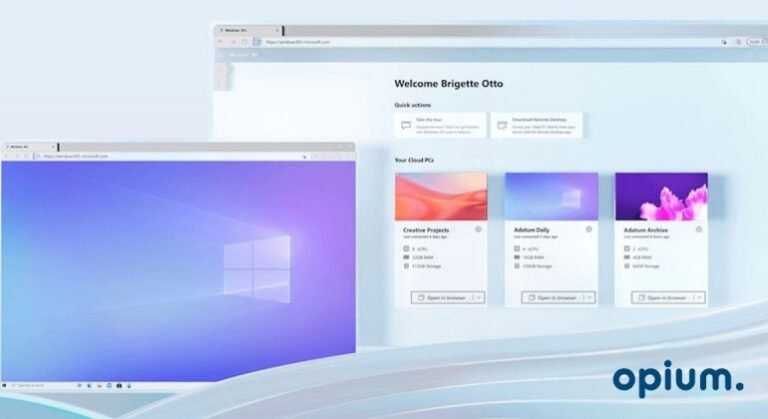
Microsoft has therefore come up with a technology that we all know and is available from any device. Windows 365 securely streams the entire Windows environment, including apps, data, and settings, to your personal or corporate devices. This revolutionary approach is changing established ways of working and creating the perfect environment for modern business.
Windows 365 is available in two versions – Enterprise and Business. The Enterprise version is designed for large corporations with hundreds of employees. It is more complex, allows for greater customization, but its setup requires deeper technical knowledge or IT specialists. Conversely, Windows 365 Business is designed for individuals, small and medium-sized businesses. What do they offer you?
Virtual computer anywhere and from anywhere
As we've already mentioned, Windows 365 displays a personalized desktop, applications, settings, and content from the cloud to any device. In practice, this gives you a virtualized computer environment that you can access from any brand of device or operating system. You can easily open your desired Microsoft 365 application in your web browser window and expand the window to full screen. Pick up where you left off – anytime, anywhere, and on any device.
Quick system transition and easy management
The Windows 365 hybrid system is simple to set up and deploy. You can get the Business version up and running in your company within 30 minutes. Conveniently, without technical skills or IT specialists, employees can handle the installation themselves. They can then start working on the platform quickly and effortlessly. Furthermore, the virtual desktop saves costs on IT management and time. This allows you to fully concentrate on your team and business.
Simple operation without expertise
The entire new cloud system, as well as all its components, can be managed in the Microsoft Endpoint Manager application, or you can open the address in your web browser at windows365.microsoft.com And you can start working immediately. Windows 365 is a complete “software as a service” solution. Microsoft developed it to be as easy to control and use as possible. Therefore, you do not need any specialized knowledge.
External collaborators will be in clover
Do you have external colleagues on your team? It's common today for some team members to work from a completely different city or even country. If you're one of these more modern companies, you'll appreciate Windows 365. It provides comprehensive support for remote workers, who can connect from anywhere, using their own computer. You, as the administrator, will issue them permission. This way, you don't have to incur additional costs to purchase company devices for peripheral collaborators. You'll enable them to work quickly and easily, while their work progress is always available online.
Always secure work and data evidence
Windows 365 utilizes verified and trusted security features. The manufacturer guarantees perfect security by leveraging cloud power and Zero Trust principles. Within the Microsoft Endpoint Manager user interface in a web browser, you can easily manage and secure all endpoints, both physical and virtual. Furthermore, modern data protection mitigates data leaks – you track and secure information directly in the cloud rather than on individual physical devices, significantly reducing security risks.
Solution for everyone who wants to grow
Microsoft's new offering is designed for organizations of all sizes seeking secure and agile hybrid work solutions. Whether you're a corporation, mid-sized enterprise, small business, or startup, if you want to advance your business and ensure comfortable work for employees both in the office and working from home, Windows 365 will not disappoint. It will help your company grow while reducing risk and costs. Enabling your employees to work anywhere, anytime will also demonstrably increase their productivity.
A meal exactly according to your needs and requirements
A modern system for your business is within reach. Choose the Business or Enterprise version and one of the basic packages – Basic (€28.20), Standard (€37.30), or Premium (€60.10). Personalized packages, tailored to your requirements, are also available.
Pricing is always paid monthly per user, so you have your costs under control without any unexpected surprises. Furthermore, Microsoft regularly monitors the performance of individual cloud computers and can recommend an upgrade option in real-time.
Make the most of Windows 365 with Microsoft 365
Take even more control of your work and bet on a cohesive Microsoft 365 ecosystem. It is the ideal solution for modern businesses that value secure and transparent records. Opium Systems We specialize in developing applications for all components of Microsoft 365, including SharePoint.
Don't worry about the system changes. We will help you transition to Microsoft 365, including migration and adoption preparation. We will train new users in your company or design and implement solutions tailored to your needs. There are many possibilities, just dive in headfirst!