


How to set up a company calendar so it actually works?  

May 20, 2026
3 minutes
Readings
Opium calendar

Imagine your company calendar as one large room full of sticky notes. One has a vacation on it, another a sick day, and another a business trip or work-from-home. Outlook just shows you as busy or „Busy“But what does that actually mean? 

In reality, however, no one knows who and where they actually are, or whether they are working or not. Planning turns into guesswork, where only questions are added, but without clear answers.

If you want to get rid of the lengthy search for colleagues, Sync your calendar with SharePoint.

Content   

Is the Outlook calendar enough?

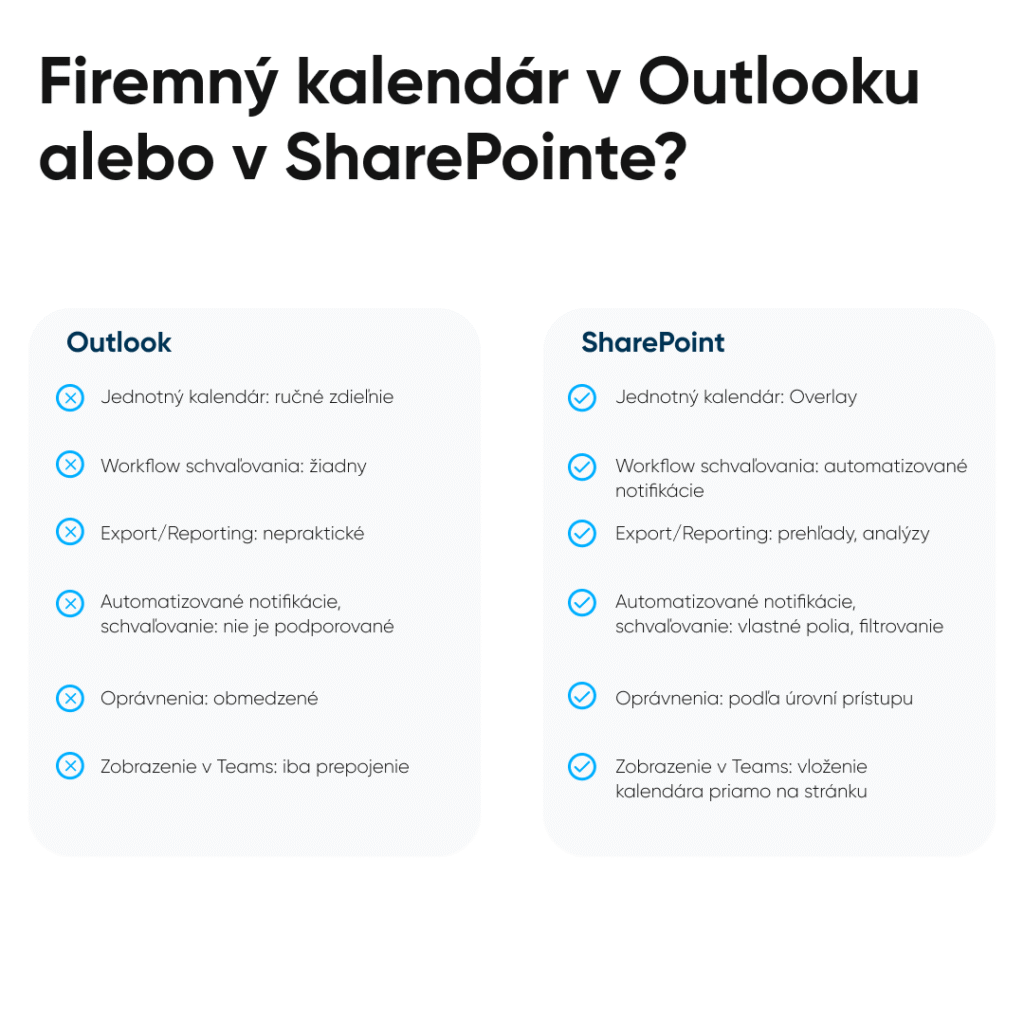
The Outlook calendar works great if you're scheduling meetings for yourself. However, if the calendar is to serve the entire company, complications will start to arise. 

  • Share with each user individually – instead of central calendar access, permissions need to be set for each user individually, one by one. 
  • No event types – Outlook does not distinguish between holidays, business trips, or doctor's appointments.
  • Copilot/AI without use– if the calendar only shows „Busy“Copilot cannot read anything more.
  • You cannot directly insert an edited calendar into the intranet or Teams.

If you're looking for oversight, automation, and collaboration, you need something more. 

SharePoint & Calendar

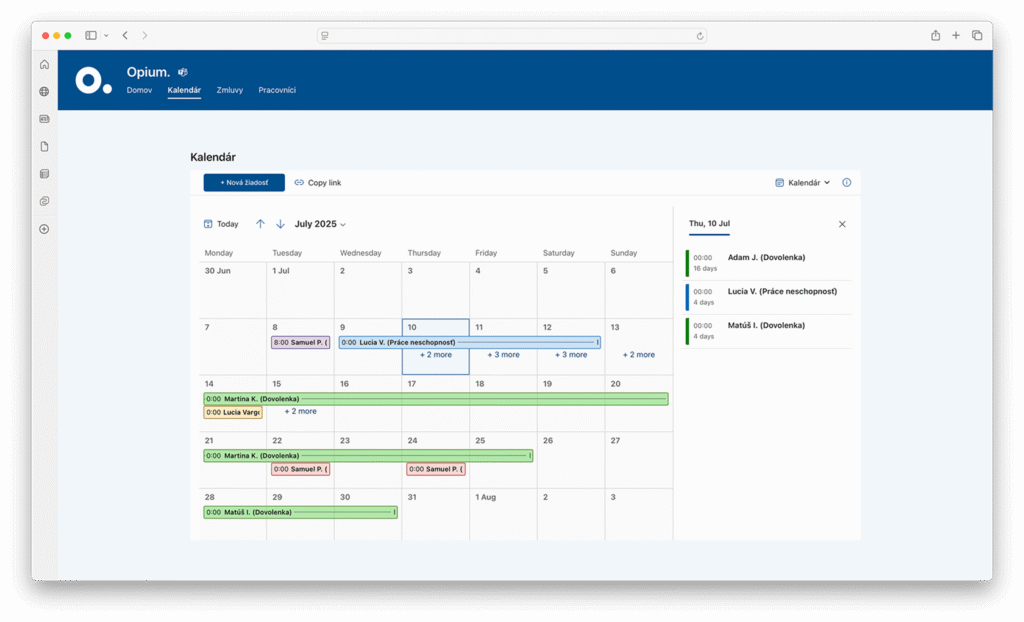
SharePoint has extra features that regular calendars don't offer. It shows more than someone is “Busy”You can easily see how long someone has been at a location. It will organize the entire team with ease.

What's so great about the SharePoint calendar?

  1. Central Administration Creation of multiple calendars in one place. HR, management, or service – each has its own content, but thanks to the overlay display, it's possible to track them with an overview simultaneously.
  2. Metadata, approvals, and versions The calendar is a smart list – a SharePoint list. It allows custom fields (event type), automatic approvals, and change history. 
  3. Sync with Outlook The calendar is easy to link to Outlook. Anything updated in SharePoint will also automatically sync to Outlook.
  4. Dashboards, filters, colors – with ease It is possible to filter event types, teams, or distinguish events by color. 
  5. Access rights Team, department, and management level permissions. No one will see more than they should. Secure and transparent permission settings.

Conclusion

If you need order in vacations, sick days, and business trips, Outlook can't handle it. Not as the main platform. Outlook is suitable for personal calendars and tasks, but for a company calendar, a system is suitable. 

SharePoint can handle these requirements with ease. Unified views, quick approvals, and secure access to authorized persons. It's not just about records and attendance, but about a system that Saves time, minimizes errors and makes from automatic planning process instead of detective work. 

Such a solution will offer you all information in one place – without clicks, duplicates, or chaos. We showed the SharePoint calendar in more detail on our webinar.

Share post

Do you like our articles?

Subscribe to our newsletter
By logging in, you agree to our
Privacy Policy

Related articles

Uncategorized
11 minutes
readings

Microsoft Copilot vs. ChatGPT, Claude, and Gemini: Why You Need a Different AI Tool for Corporate Data

Let’s be honest right from the start: your people are already using AI. Some have ChatGPT rewrite their emails, others fed yesterday’s meeting notes into Claude to extract action items, and a salesperson used Gemini to summarize a competitor’s offer. They’re doing this for a good reason—it saves them time. They often do this on personal accounts that you don’t even know about.  And that’s exactly the point. The question for companies today isn’t „should we use AI or not?“ That ship has long since sailed. The question is: Will the AI that the company controls—and that runs on your data—be secure, or will it cause an uncontrolled outflow of company information to third-party servers, which has long been underway? Let’s get straight to the point.  What does „using Microsoft 365 in a business“ actually mean? Microsoft 365 isn’t just Word, Excel, and Outlook, for which you pay licensing fees. It’s an entire ecosystem—SharePoint for documents and the intranet, Teams for communication, Power BI for reports, and above all, Microsoft 365 Copilot—that is, AI that isn’t just floating in the air but works directly on your data.  That’s a fundamental difference from what you might imagine when you think of „using AI.“ Copilot in M365 doesn’t just know the internet—it knows your entire company. It knows what’s in your SharePoint documents, what’s been discussed in Teams, and what’s in your calendar and emails. And it operates within the permissions you already have in place at your company.  Most of the companies we know don’t even use 20% of what they’re paying for in Microsoft 365. The licenses are active, Copilot is right at your fingertips, and yet employees are still copying data into third-party tools. That’s exactly the kind of nonsense worth eliminating.  Where does Microsoft 365 actually save time? Specifically, not just in marketing buzzwords. The most common scenarios we see with clients: […]

On a wooden table next to a candle, a glass, books, and a decorative plant lies a laptop with the Copilot application open. The word „opium“ appears in the bottom right corner.
Microsoft
9 minutes
readings

New Copilot Features in SharePoint: Tips, Tricks, and Practical Real-World Scenarios 

If you've been following the development of AI for a longer time, just like us, and you're familiar with Copilot, then in our previous article, we already looked at how it can function as an everyday assistant for content work. However, things have progressed since then, not with one wow feature, but with a number of practical improvements that are starting to be noticeable, especially in regular workdays. We'll introduce you to 5 useful features that are gamechangers in daily work life. In other words, Copilot is already [...]

A person is looking at a city planning digital interface on a desktop computer monitor, which displays a futuristic city model with icons in the workspace. In the bottom right corner, the word opium is displayed in a blue circle.
Digitization
7 minutes
readings

If cities stopped putting out fires: 3 solutions that save them hundreds of hours today

Imagine a Monday morning at the city hall. The department head opens their laptop, needing to check the status of an investment project. They start searching through emails. Then they call a colleague. The colleague sends an Excel file – but it's not the right one. A third attempt. Fifteen minutes gone. And the project is still not clear. This is not an exception. This is the daily reality for most Slovak municipalities. In our experience, the average [...]

A friendly robot hovers next to a futuristic interface displaying AI-generated images and Slovak text, with a blue logo reading "opium" in the lower right corner.
Digitization
7 minutes
readings

AI agents in companies: when software works for you 

Let's admit one thing. Almost everyone uses artificial intelligence today. Some people write texts with it, some create presentations, some have Excel tables generated for them. AI has become a universal assistant: you open it, ask a question, get an answer, and continue. But while most people use AI as a handy tool, something a level higher is starting to appear in companies. An AI agent. And surprisingly many [...]

Two men in chef hats and casual jackets stand smiling indoors by a metal railing. In the bottom right corner is a blue graphic with the word opium.
Case study
4 minutes
readings

How to set up a Digital Workflow?

At Opium.systems, we love innovation, and sometimes we even „cook“ it up. One of our most unique activities, which we recently implemented at the Slovak Savings Bank's business conference, BIKOSS 2025, is the cooking show „How to Cook a Digital Workflow.“ Why did we have a cooking show, anyway? During typical digitization training or workshops, the human experience is often lacking – processes, workflow mapping, and automation are [...]

A man in glasses and a striped shirt is sitting at a desk, working on a computer in a modern office with plants and round blue walls. In the bottom right corner, the word "opium" is displayed in white text on a blue background.
Help
5 minutes
readings

AI Agent Security - How Not to Let Your Copilot Sniff Out Your Secrets 

AI agents are like Swiss Army knives in the digital world. They can read, write, connect data, send notifications, automate workflows... if you set them up correctly, they won't even forget your boss's birthday. But in the wrong hands, or without oversight? They could accidentally reveal sensitive information, modify the wrong record, or trigger a process that wasn't supposed to be released yet. Their deployment can be either a win, [...]