How to set up a company calendar so it actually works?
April 22, 2026
3 minute read
Predstavte si, že váš firemný kalendár je jedna veľká miestnosť plná nalepovacích papierikov. Na jednom je dovolenka, na druhom PN-ka a na ďalšom pracovná cesta či homeoffice. Outlook vám len ukáže stav zaneprázdnený prípadne „busy“, ale čo to vlastne znamená?
V realite však nikto nevie kto a kde vlastne je, či pracuje, alebo nie. Z plánovania sa stáva dohadovanie, kde iba pribúdajú otázky, avšak bez jasných odpovedí.
Ak sa chcete zbaviť zdĺhavého pátrania po kolegoch, upracte si kalendár so SharePointom.
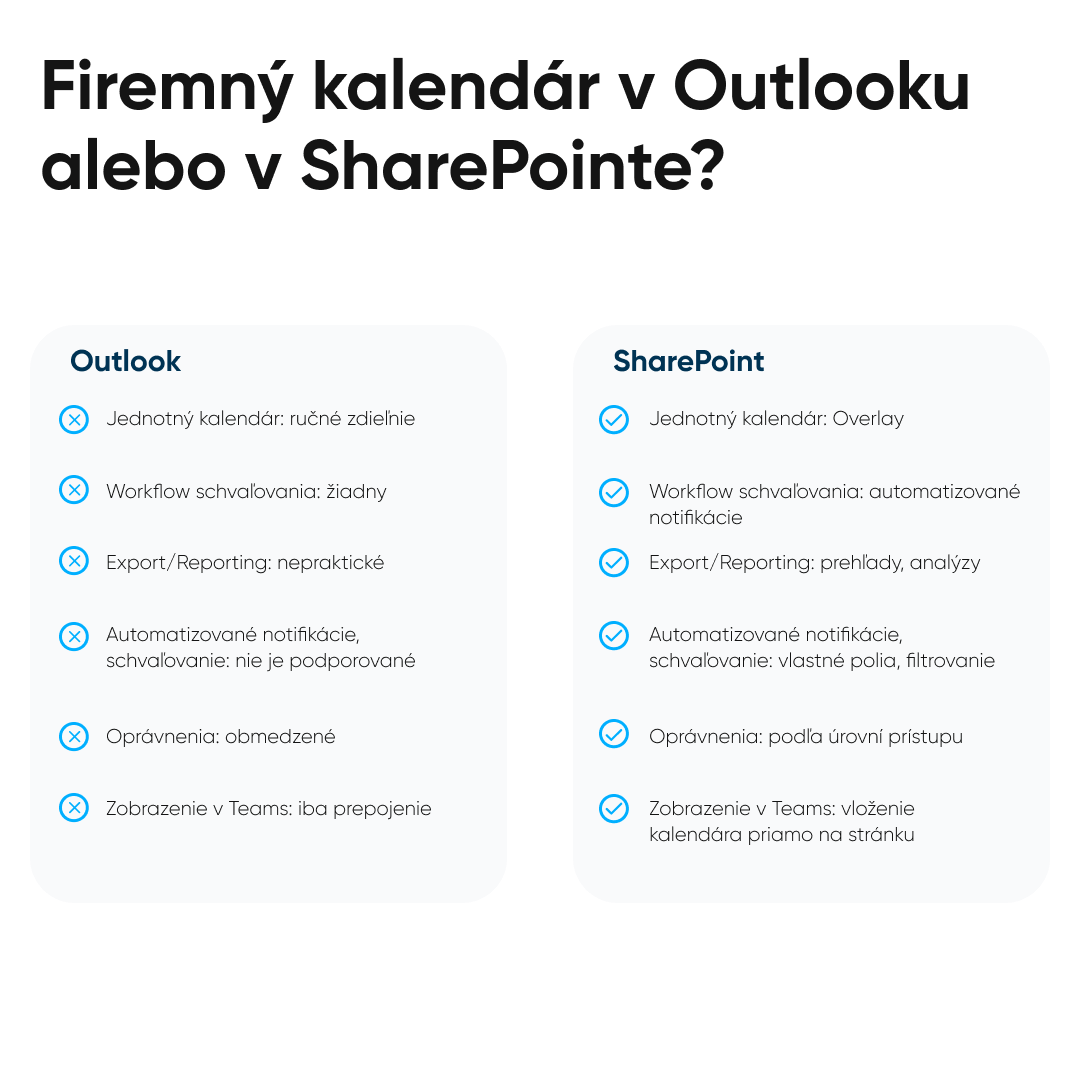
Outlook kalendár funguje skvele, pokiaľ si plánujete stretnutia sami pre seba. Avšak, ak má kalendár slúžiť celej firme, začnú sa objavovať komplikácie.
Zdieľanie každému používateľovi zvlášť – namiesto centrálneho prístupu ku kalendáru je potrebné nastaviť práva používateľovi osobitne, jednému za druhým.
Žiadne typy udalostí – Outlook nerozoznáva či sa jedná o dovolenky, služobné cesty alebo návštevu lekára.
Copilota/AIbez využitia– ak v kalendár signalizuje iba „busy“, Copilot nedokáže vyčítať nič viac.
Nemožno vložiť priamo upravený kalendár do intranetu či do Teams.
Ak hľadáte prehľad, automatizáciu a spoluprácu potrebujete niečo viac.
SharePoint & Kalendár
SharePoint má extra funkcie, ktoré bežné kalendáre neponúkajú. Ukáže viac ako to, že je niekto “busy”. Ľahko zistíte ako dlho sa kde kto nachádza. S prehľadom zorganizuje celý tím.
Čo je na kalendári v SharePointe také super?
Centrálna správa – tvorba viacerých kalendárov na jednom mieste. HR, manažment či servis – každý má vlastný obsah, ale vďaka overlay zobrazeniu je možné ich sledovať s prehľadom súčasne.
Metadata, schválenia a verzie – kalendár je smart zoznam – SharePoint list. Umožňuje vlastné polia (typ udalosti), automatické schvaľovanie či históriu zmien.
Synchronizácia s Outlookom – kalendár je jednoduché prepojiť s Outlookom. Čokoľvek sa aktualizuje v SharePointe sa automaticky synchronizuje aj do Outlooku.
Prehľady, filtre, farby – s ľahkosťou je možné vyfiltrovať typy udalosti, tímy alebo podľa farby rozlíšiť udalosti.
Prístupové práva – oprávnenia na úrovni tímu, oddelenia, manažmentu. Nikto neuvidí viac než by mal vidieť. Bezpečné a transparentné nastavenie práv.
Conclusion
Ak potrebujete poriadok v dovolenkách, PN-kach a služobkách, Outlook to neutiahne. Nie ako hlavná platforma. Outlook je vhodný pre osobné kalendáre a úlohy, ale pre firemný kalendár je vhodný system.
SharePoint tieto požiadavky zvládne s prehľadom. Jednotné zobrazenia, rýchle schvaľovania či bezpečný prístupiba opravneným osobám. Nie je to len o evidencii a dochádzke, ale o systéme, ktorý šetrí čas, minimalizuje chyby a spraví z plánovania automatický proces namiesto detektívnej práce.
Takéto riešenie vám ponúkne všetky informácie na jednom mieste – bez preklikávania, duplicít či chaosu. Bližšie sme si SharePoint kalendár ukázali na našom webinári.
Matúš Izakovič
Share post
Article content
Do you know where exactly you're wasting time and money?
Launch our NONSENSE SCANNER. In 3 minutes, you'll find out how much precious time and money you're actually burning on unnecessary operations.